Delete an Idle NAT Gateway
Overview
This tutorial demonstrates how to identify and remove an idle NAT Gateway that is incurring unnecessary costs. NAT Gateways cost approximately $32.85/month (or $0.045/hour) just for being provisioned, plus data processing charges of $0.045/GB. An idle NAT Gateway processing less than 1GB/day can cost around $34/month ($410/year) while providing minimal value.
Estimated Time: 10-15 minutes Cost Impact: Saves ~$34/month per idle NAT Gateway
Prerequisites
- AWS Console access with permissions to view and delete NAT Gateways
- Access to view CloudWatch metrics and Route Tables
- Understanding of your VPC networking requirements
Steps
1. Navigate to NAT Gateways Console
Open the AWS VPC Console and navigate to NAT gateways in the us-east-1 region.
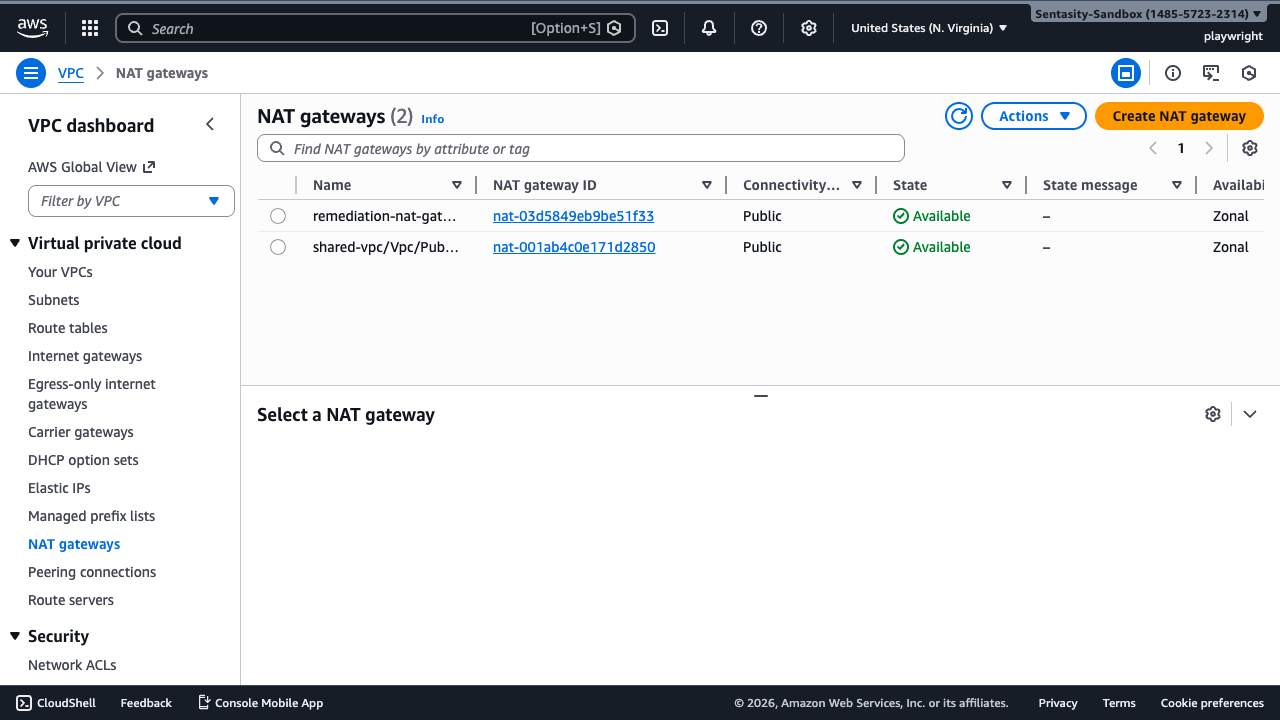
In the list, locate the NAT Gateway you want to evaluate. In this example, we're examining nat-03d5849eb9be51f33 named "remediation-nat-gateway-idle-nat".
2. Review NAT Gateway Details
Click on the NAT Gateway ID to view its detailed configuration.
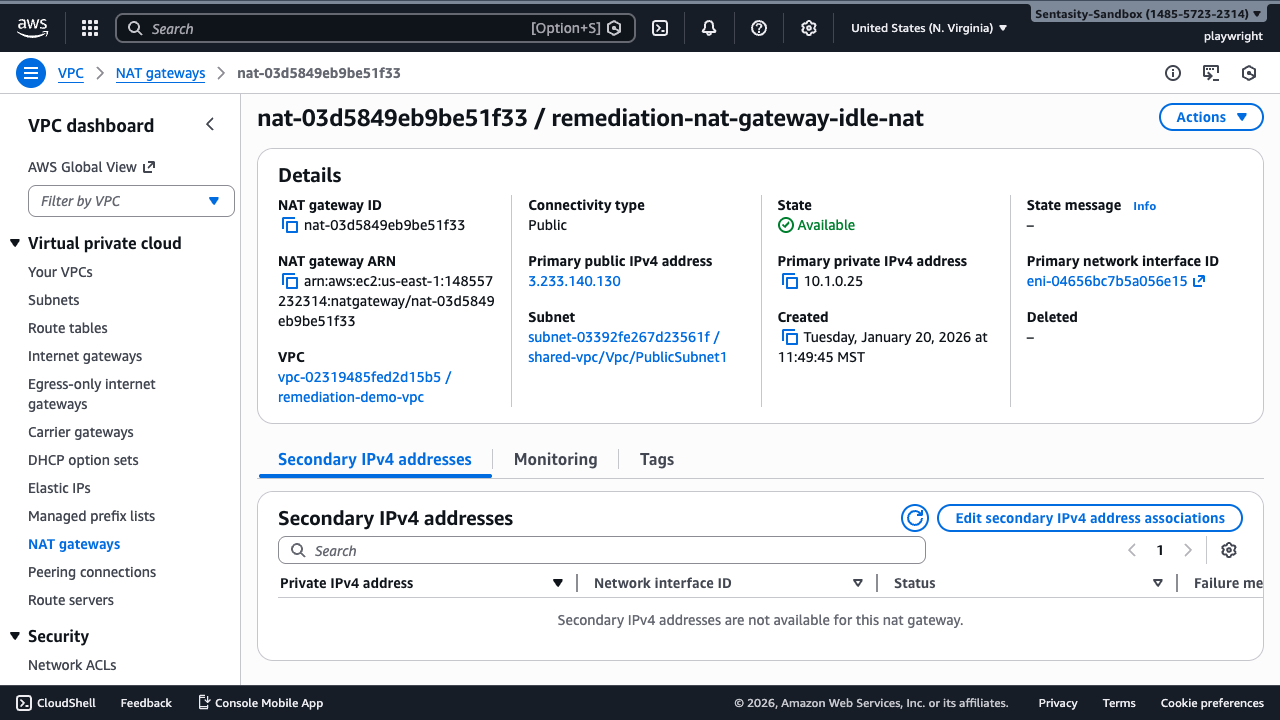
Note the following information:
- State: Available
- Primary public IPv4 address: 3.233.140.130 (Elastic IP)
- VPC: vpc-02319485fed2d15b5 / remediation-demo-vpc
- Subnet: subnet-03392fe267d23561f / shared-vpc/Vpc/PublicSubnet1
- Elastic IP allocation: eipalloc-01396a9bda4dc45a4
This information helps you understand the NAT Gateway's configuration and associated resources.
3. Check CloudWatch Metrics
Click on the Monitoring tab to view traffic metrics.
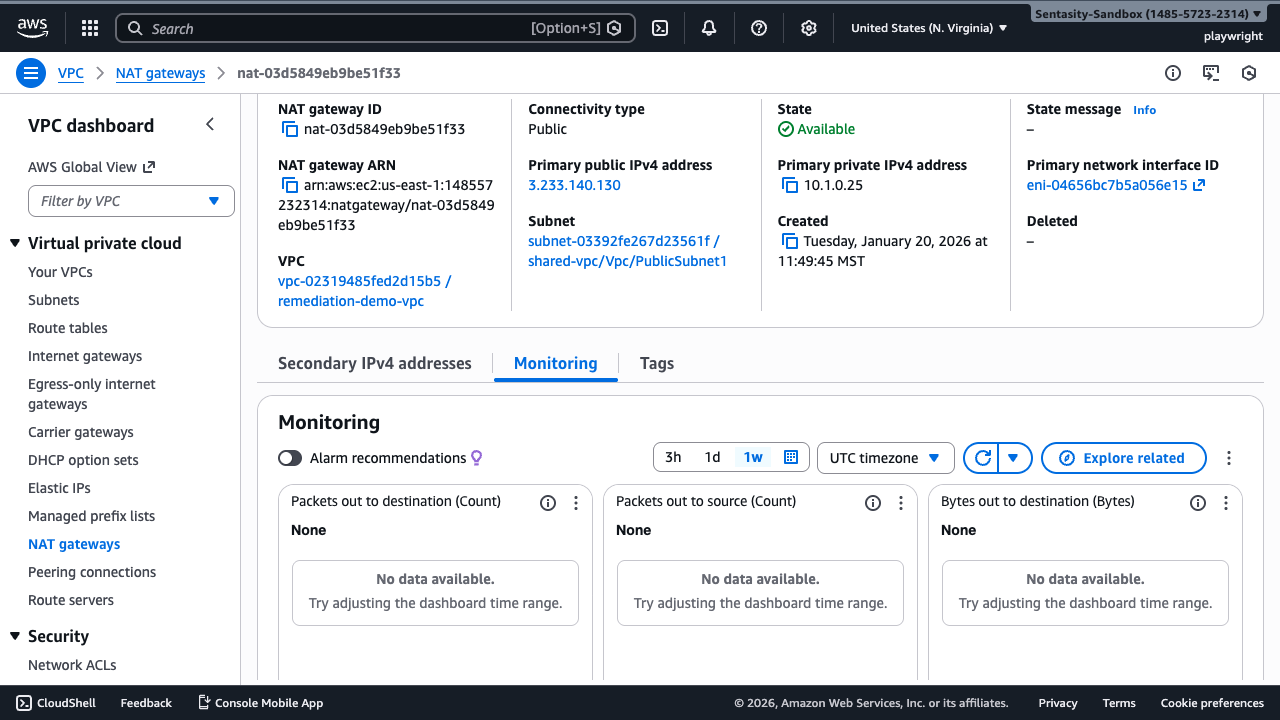
Review the following metrics over the past week:
- Bytes out to destination: Data sent through the NAT Gateway
- Packets out to destination: Packet count
- Packets out to source: Return traffic
If you see minimal or no traffic (< 1GB/day), this NAT Gateway is a candidate for removal. In this example, the metrics show "No data available" because this is a newly created gateway with no traffic.
Note: For an actively idle NAT Gateway, you would see very low values (e.g., < 30GB/month total).
4. Identify Route Table Dependencies
Navigate to Route Tables in the VPC console to check which subnets route traffic through this NAT Gateway.
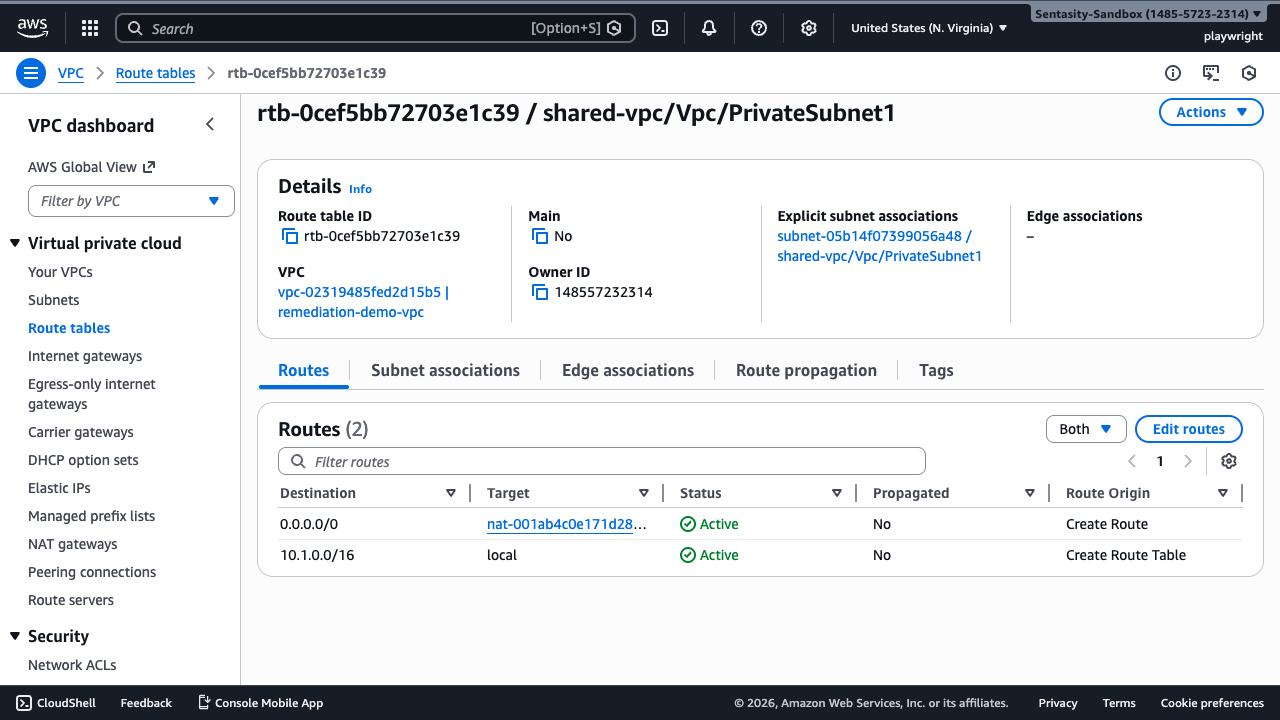
Search for routes targeting nat-03d5849eb9be51f33. In this example, we see that private subnet route tables use a different NAT Gateway (nat-001ab4c0e171d2850), which means our idle NAT Gateway has no active dependencies.
Important: If you find route tables pointing to the NAT Gateway you want to delete, you must first:
- Determine if the associated subnets need internet access
- Either remove the routes or update them to use an alternative NAT Gateway
- Edit the route tables to remove references to the NAT Gateway before deletion
5. Consider VPC Endpoint Alternatives
Before deleting the NAT Gateway, evaluate whether VPC endpoints could replace it. Navigate to Endpoints in the VPC console.
If your private subnet resources only access AWS services (S3, DynamoDB, etc.), consider creating VPC endpoints instead:
- Gateway endpoints (S3, DynamoDB): Free, no data processing charges
- Interface endpoints (other services): $0.01/hour per AZ (~$7/month) but eliminate NAT Gateway costs
This can significantly reduce costs if you don't need general internet access.
6. Delete the NAT Gateway
Return to the NAT Gateways console, select the idle NAT Gateway, and click Actions → Delete NAT gateway.
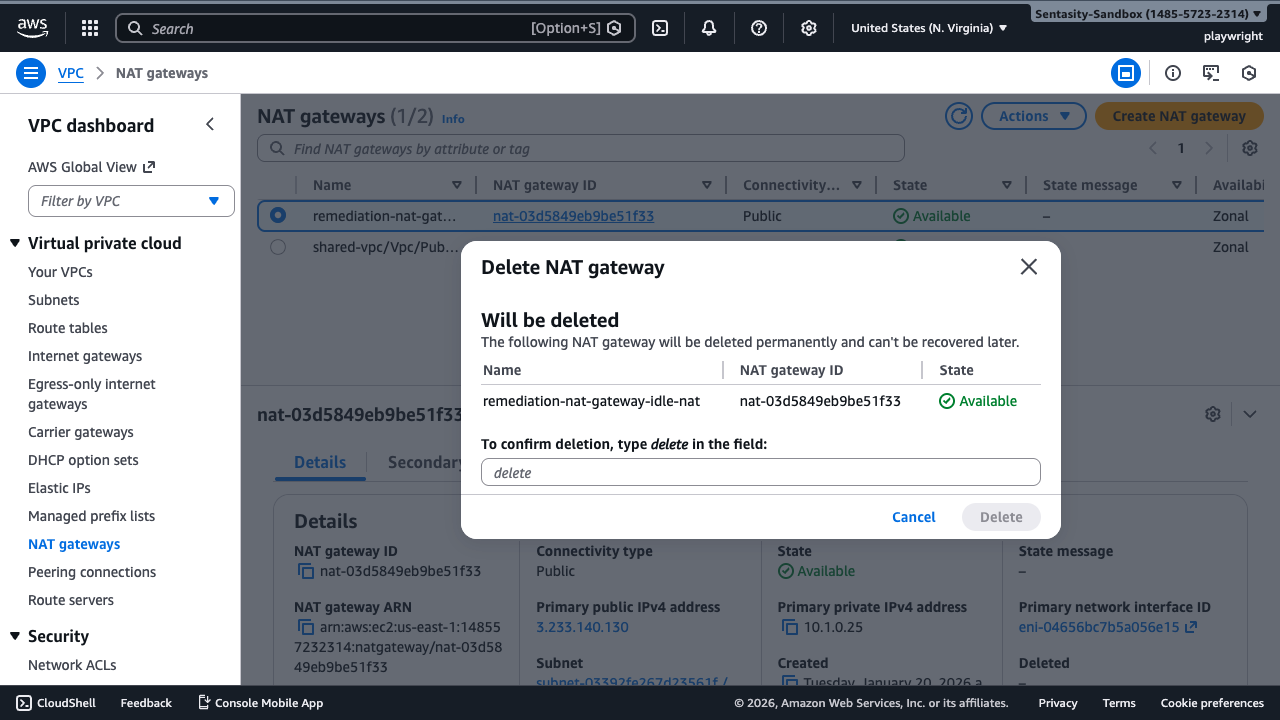
The deletion dialog shows which NAT Gateway will be removed. Review the information carefully to ensure you're deleting the correct gateway.
7. Confirm Deletion
Type delete in the confirmation field to proceed.
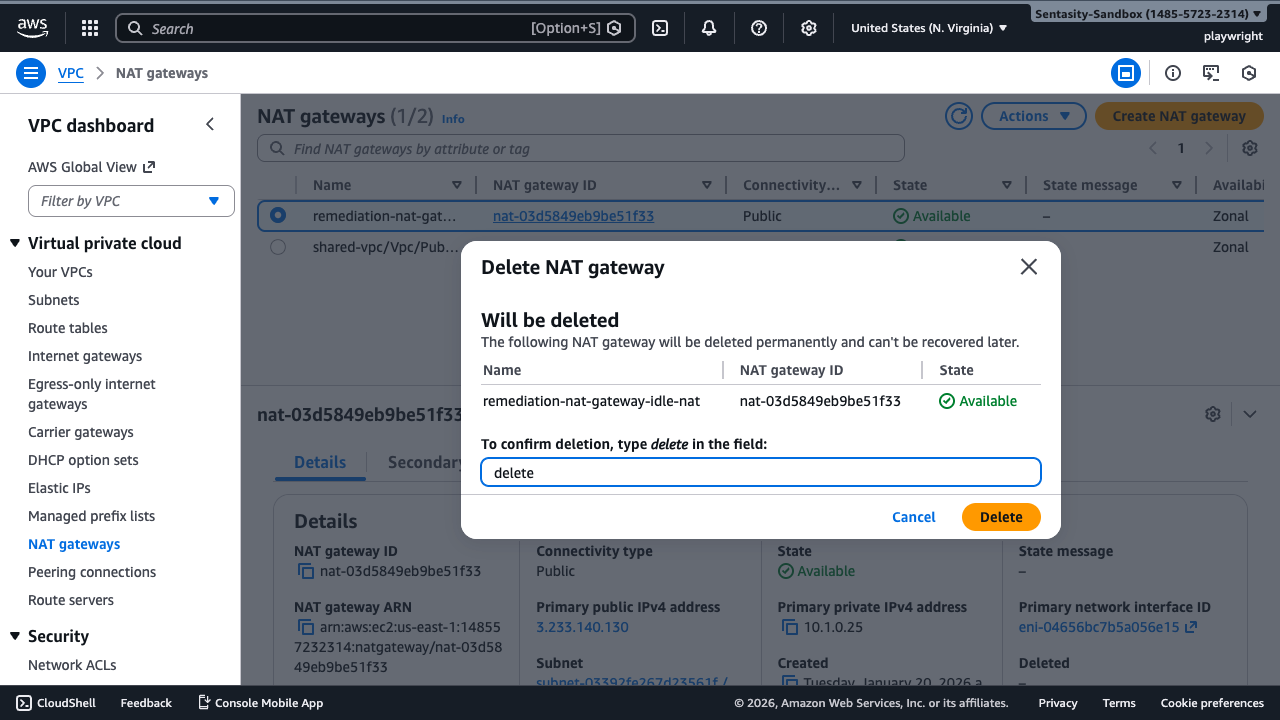
Click Delete to confirm. The NAT Gateway will enter a "deleting" state and hourly charges will stop immediately.
Note: It may take several minutes for the deletion to complete. The state will change from "deleting" to "deleted".
8. Release the Elastic IP (Optional but Recommended)
After the NAT Gateway is deleted, its associated Elastic IP becomes unassociated but still incurs charges ($0.005/hour or ~$3.60/month).
To release the Elastic IP:
- Navigate to Elastic IPs in the VPC console
- Find the unassociated EIP (3.233.140.130 / eipalloc-01396a9bda4dc45a4)
- Select it and click Actions → Release Elastic IP address
- Confirm the release
This eliminates the additional ~$3.60/month charge for the unused Elastic IP.
Cost Savings Breakdown
For an idle NAT Gateway with < 30GB/month traffic:
- NAT Gateway hourly charge: $0.045/hour × 730 hours = $32.85/month
- Data processing: 30GB × $0.045/GB = $1.35/month
- Unused Elastic IP: $0.005/hour × 730 hours = $3.65/month
Total Monthly Savings: ~$34/month Annual Savings: ~$410/year
Alternative Approaches
If you need occasional NAT functionality:
- VPC Endpoints: For AWS service access only (S3, DynamoDB, etc.) - gateway endpoints are free
- NAT Instance: For very low traffic (<100GB/month), a t3.nano NAT instance costs ~$3.80/month but requires more management
- Public Subnet: If resources don't need to be private, place them in a public subnet with proper security groups
- Consolidate NAT Gateways: Route multiple AZs through a single NAT Gateway (reduces redundancy but cuts costs)
Verification
After deletion:
- Return to NAT Gateways list - confirm the gateway shows "deleted" state
- Check Elastic IPs - verify the EIP is released (not in your allocations)
- Review your AWS bill in the following month to confirm cost reduction
Important Considerations
- High Availability: Deleting a NAT Gateway reduces AZ redundancy. Ensure this aligns with your availability requirements.
- Route Table Updates: Always update or remove route table entries before deletion to avoid connectivity issues.
- VPC Endpoints: Consider using VPC endpoints for AWS service access before deleting NAT Gateways.
- Testing: If unsure, monitor traffic for 7-14 days before deletion to ensure the gateway is truly idle.
Summary
You've successfully identified an idle NAT Gateway, verified it has minimal usage, checked for dependencies, and learned how to delete it to eliminate ~$34/month in unnecessary costs. Remember to also release the associated Elastic IP to maximize savings.