Enable Point-in-Time Recovery (PITR) on a DynamoDB Table
Overview
This tutorial walks through enabling Point-in-Time Recovery (PITR) on a DynamoDB table via the AWS Console. PITR provides continuous backups of your DynamoDB table data, allowing restoration to any point within the last 35 days. This protects against accidental writes, deletes, or application bugs that corrupt data.
Benefits of Enabling PITR
- Data protection: Restore your table to any second within the last 35 days
- Automatic backups: No need to schedule or manage backup jobs
- No performance impact: PITR runs in the background without affecting table performance
- Compliance: Meets backup requirements for many regulatory frameworks
Prerequisites
- AWS account with DynamoDB permissions
- Access to the AWS Console
- A DynamoDB table that does not have PITR enabled
Step-by-Step Instructions
Step 1: Navigate to the DynamoDB Table
- Log in to the AWS Console
- Navigate to DynamoDB in the services menu
- Open the remediation-dynamodb-no-pitr-table table
Step 2: Open the Backups Tab
Click the Backups tab to view the table's backup configuration.
Step 3: Confirm PITR Is Currently Disabled
In the Point-in-time recovery (PITR) section, confirm that the status shows Disabled. This means the table is not protected against accidental writes or deletes — data cannot be restored to a previous point in time.
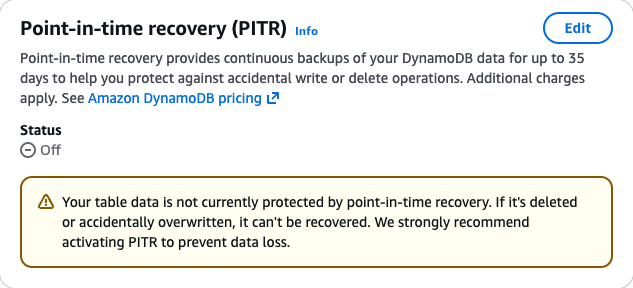
Step 4: Open the PITR Edit Dialog
Click Edit in the Point-in-time recovery section.
Step 5: Enable Point-in-Time Recovery
Turn on the Point-in-time recovery toggle (or check the checkbox) to enable continuous backups.
Step 6: Save Changes
Click Save changes to apply the configuration.
Step 7: Verify PITR Is Enabled
Verify that the PITR status now shows Enabled. You should see the Earliest restore date and Latest restore date fields populated, confirming continuous backups are active. The table is now protected against accidental data loss for up to 35 days.
Cost Impact
Enabling PITR adds a cost of $0.20 per GB-month based on the table's size. For most tables this is minimal — a 1 GB table costs approximately $0.20/month. This is a small price for data protection against accidental deletions or application bugs.
Alternative Approaches
AWS CLI:
aws dynamodb update-continuous-backups \
  --table-name remediation-dynamodb-no-pitr-table \
  --point-in-time-recovery-specification PointInTimeRecoveryEnabled=true \
  --region us-east-1
CloudFormation / CDK:
Add pointInTimeRecoveryEnabled: true to your DynamoDB table definition.
Terraform:
point_in_time_recovery {
  enabled = true
}
Related Resources
Conclusion
Enabling Point-in-Time Recovery on your DynamoDB tables is a simple, low-cost safeguard against accidental data loss. With PITR active, you can restore your table to any second within the last 35 days, providing peace of mind for production workloads. We recommend enabling PITR on all DynamoDB tables that contain important data.