Upgrade AWS EBS Volumes from gp2 to gp3
Overview
This tutorial guides you through upgrading an Amazon EBS volume from gp2 (General Purpose SSD) to gp3 (the latest generation General Purpose SSD). This upgrade provides immediate cost savings of approximately 20% while improving baseline performance.
Benefits of Upgrading to gp3
- 20% cost savings: gp3 volumes cost $0.08/GB-month vs $0.10/GB-month for gp2
- Better baseline performance: gp3 provides 3,000 IOPS and 125 MB/s throughput regardless of volume size
- Predictable performance: No more reliance on burst credits
- Zero downtime: Volume modifications occur online without detaching from instances
Prerequisites
- AWS account with EC2 permissions
- Access to the AWS Console
- At least one gp2 volume to upgrade
Step-by-Step Instructions
Step 1: Navigate to EBS Volumes Console
- Log in to the AWS Console
- Navigate to EC2 > Elastic Block Store > Volumes
- Ensure you're in the correct region (check the region selector in the top-right)
Step 2: Identify and Select the gp2 Volume
Locate the gp2 volume you want to upgrade. You can filter by:
- Volume type: gp2
- State: available or in-use
Select the checkbox next to the volume you want to modify.
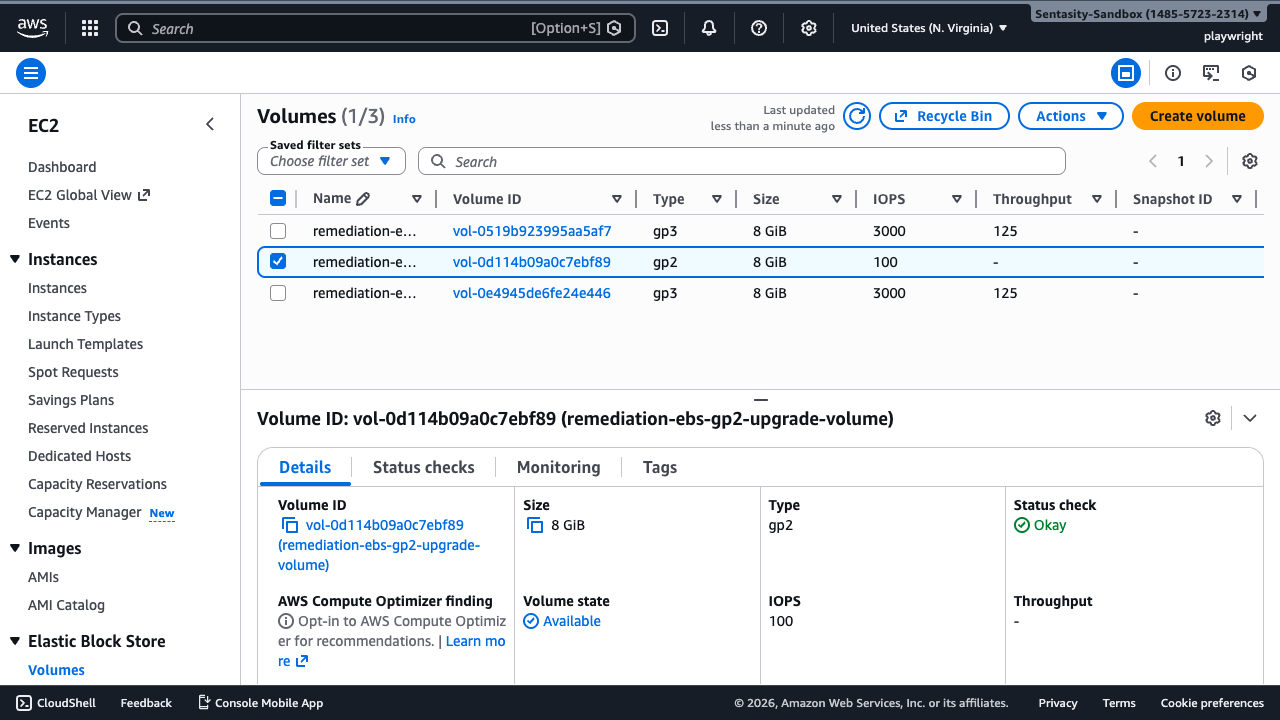
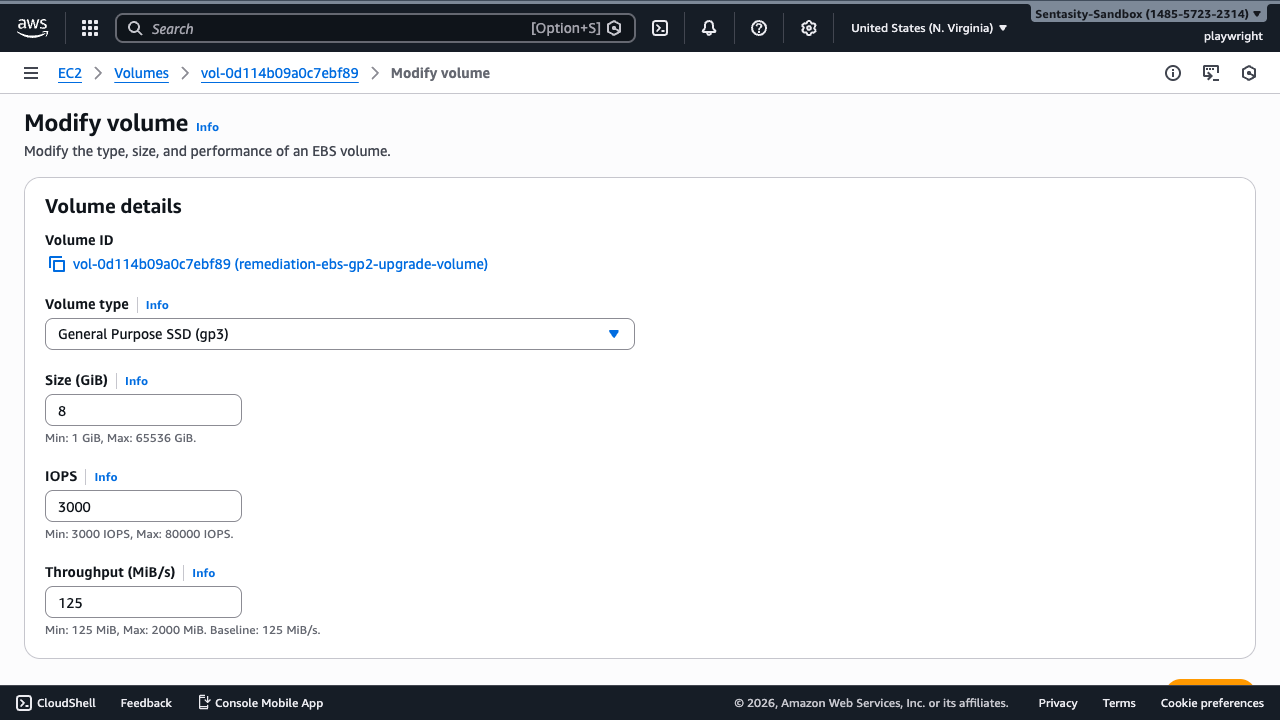
In this example, we're upgrading a volume named "remediation-ebs-gp2-upgrade-volume" (vol-0d114b09a0c7ebf89).
Step 3: Open the Modify Volume Dialog
With the volume selected, click Actions → Modify volume
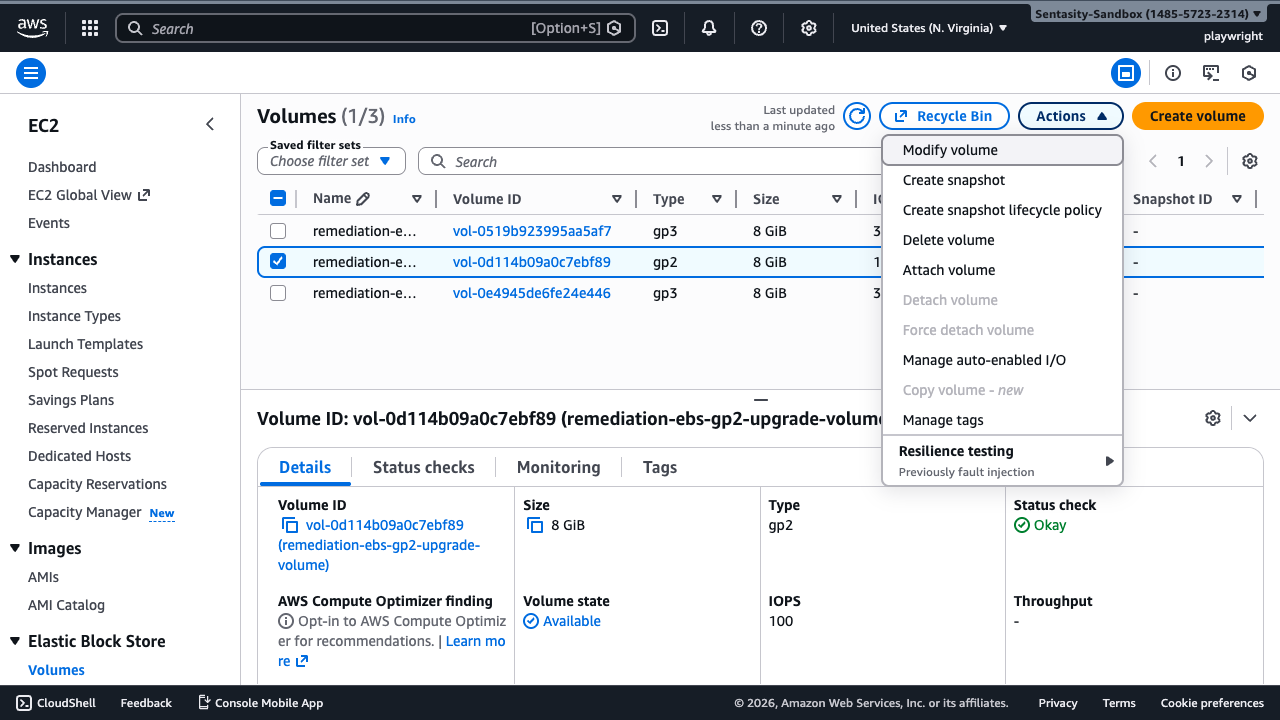
Step 4: Change Volume Type to gp3
In the "Modify volume" dialog:
- Locate the Volume type dropdown
- Change from gp2 to gp3
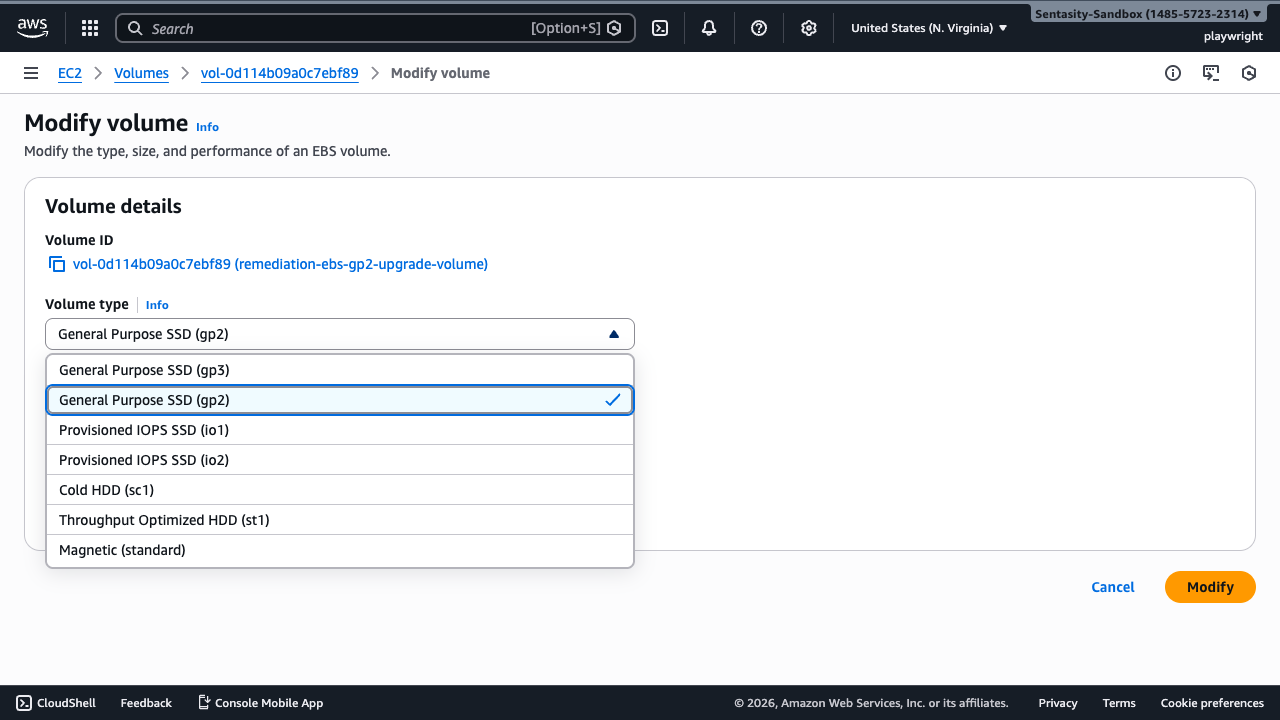
Step 5: Review the New Configuration
After selecting gp3, the dialog will display the new performance characteristics:
- IOPS: 3,000 (baseline, no bursting needed)
- Throughput: 125 MiB/s (baseline)
For most workloads, these defaults provide better performance than gp2 at lower cost.
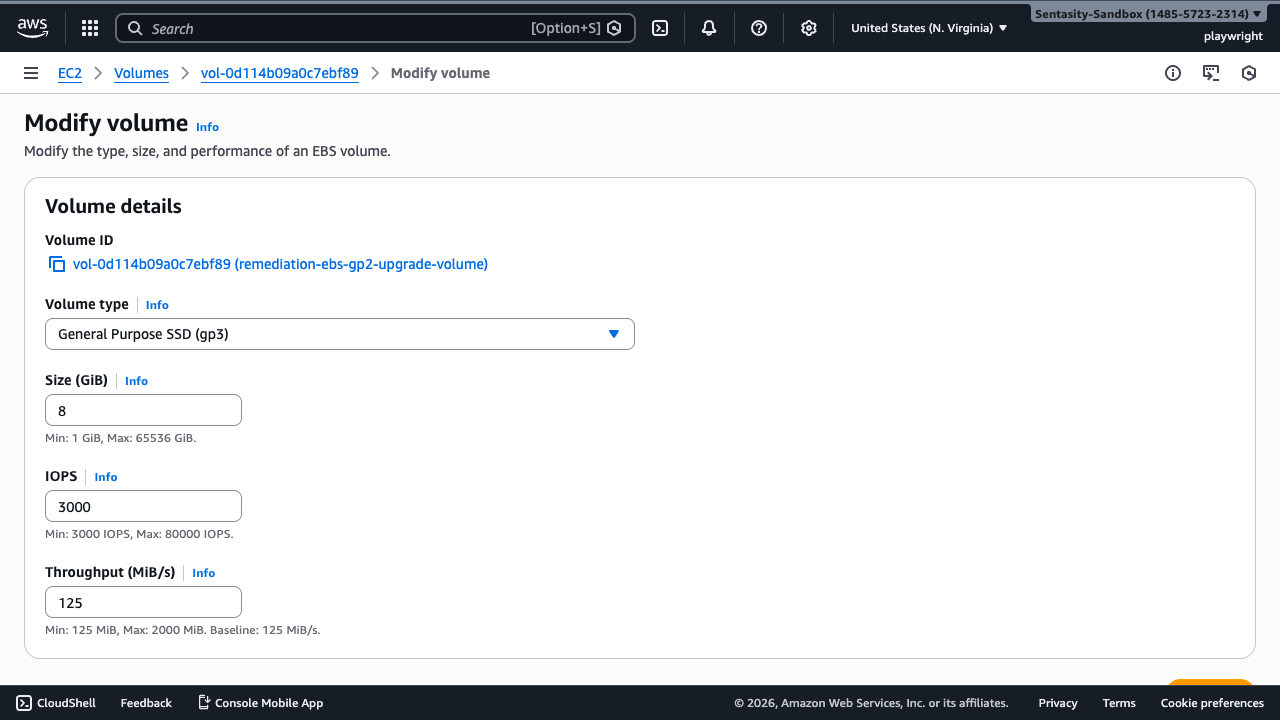
Note: You can optionally increase IOPS up to 16,000 or throughput up to 1,000 MiB/s for additional cost if your workload requires it.
Step 6: Confirm the Modification
Click Modify to confirm the volume type change.
Step 7: Acknowledge the Modification Request
AWS will display a confirmation dialog. Click Modify again to proceed with the change.
Step 8: Monitor the Modification Progress
After confirmation, you'll see:
- A success notification banner
- The volume state will show as "optimizing" or "modifying"
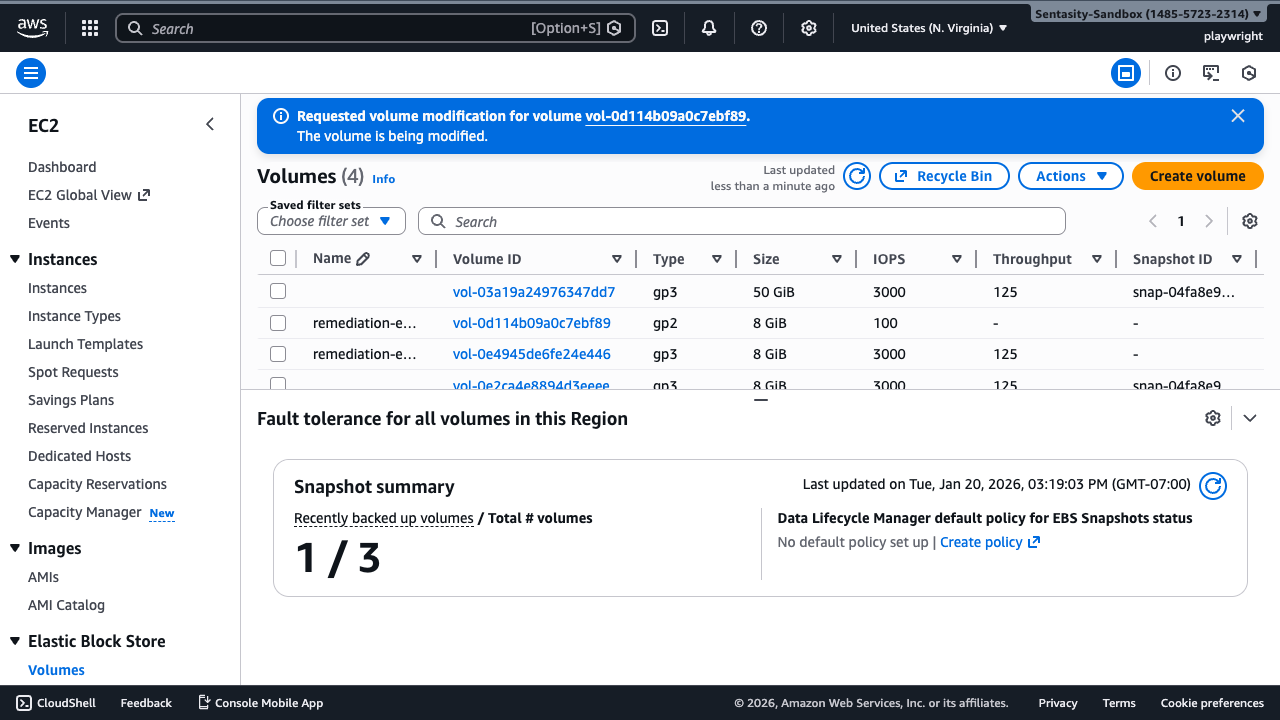
The modification process typically takes a few minutes. During this time:
- The volume remains fully available
- No downtime is required
- Performance may be temporarily affected during optimization
Step 9: Verify Successful Upgrade
Once the modification completes, verify the changes:
- Refresh the volumes list
- Confirm the Type column now shows gp3
- Verify IOPS shows 3,000
- Verify Throughput shows 125
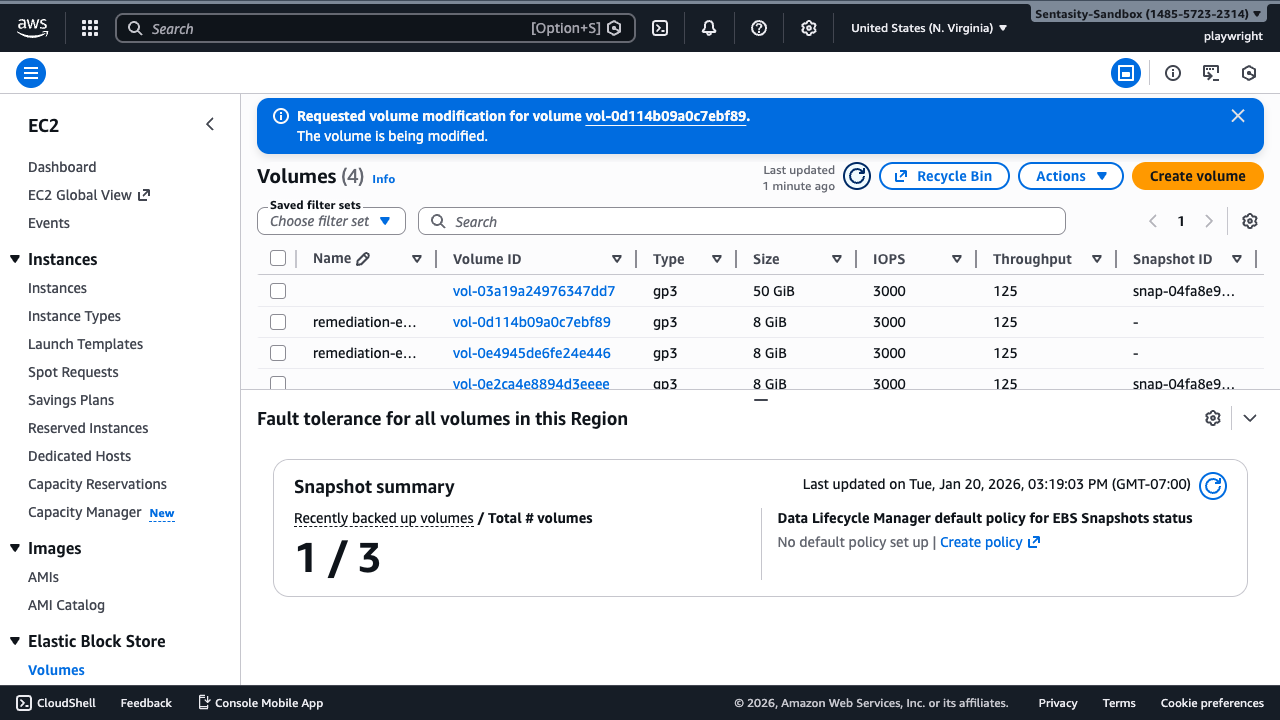
The upgrade is complete! Your volume now benefits from:
- 20% cost savings
- 3,000 IOPS baseline (vs 100-3,000 burstable for gp2)
- 125 MB/s throughput baseline
- More predictable performance
Cost Savings Example
For a 100 GB volume:
- gp2 cost: $10.00/month
- gp3 cost: $8.00/month
- Monthly savings: $2.00 (20%)
- Annual savings: $24.00
The savings scale with volume size, making gp3 especially cost-effective for larger storage deployments.
Best Practices
- Upgrade all gp2 volumes: Unless you have specific reasons to keep gp2, upgrading to gp3 is recommended for all volumes
- Monitor performance: After upgrading, monitor your application metrics to ensure performance meets requirements
- Consider increased IOPS/throughput: For demanding workloads, you can increase gp3 IOPS (up to 16,000) or throughput (up to 1,000 MiB/s) independently for additional cost
- Automate at scale: For large environments, use AWS CLI or SDKs to automate volume upgrades
Troubleshooting
Modification stuck in "optimizing": This is normal and can take up to several hours for large volumes. The volume remains available during this time.
Cannot modify volume: Ensure the volume is not in the "modifying" or "optimizing" state from a previous change. Only one modification can be in progress at a time.
Performance issues after upgrade: Allow the optimization process to complete fully. If issues persist, verify your application's IOPS and throughput requirements match the gp3 configuration.
Related Resources
Conclusion
Upgrading from gp2 to gp3 is a straightforward process that provides immediate cost savings and improved performance. The modification can be performed online without any downtime, making it safe to upgrade production volumes. We recommend reviewing all your gp2 volumes and upgrading them to gp3 to take advantage of these benefits.